Custom Game Engine Devlog Week 3
Estimated Time Spent: 8 hours
Accomplishments:
Created a fully platform-independent graphics interface.
Increased performance by utilizing indexed drawing and cutting down on stored member variables in instanced classes.
Added support for animated background colors.
Hey! My house has a door now…
Simplifying Graphics.cpp:
The most important thing about designing an engine is not a powerful grasp on C++ techniques, but having a strong plan and set of intentions for each element. I knew that I wanted graphics.cpp to be a generalized, user-facing manager that could provide an overview of the rendering process without getting too in-the-weeds on implementation. Last week’s iteration of the file was an improvement, but it still featured too much platform-specific code for things like swapping buffers, clearing the background, and cleaning up proprietary member vaiables. To solve this, I created a new class titled ‘Platform Renderer’. This class uses the same strategy that graphics used to, in which a single header file has two .cpp files - one for D3D, another for openGL. I then deleted the .d3d and .gl files for graphics, replacing them with a single file called ‘graphics.cpp’. An static instance of the platform renderer is now declared in the graphics file, handling of all its dirty platform-specific work with single lines of interface code.

Swapping Buffers in graphics.cpp is significantly easier now!
Next, it was time to tackle the effect code. Up to this point, shaders were hard-coded into the graphics file - not the most flexible system for a game engine. To handle this, I first added parameters to the ‘Effect’ class’s Initialization function, allowing it to take a string for the names of the vertex and fragment shaders it would like to use. However, I was still unsatisfied, as it felt like a pain point for users to write in full path strings to their desired shaders. Thus, I created another class titled ‘Shader Manager’, which stores all the names of commonly used shaders as string member variables. These strings can then be accessed through a function that takes an enum as a parameter - allowing the user to specify the type of shader they want, without needing to remember its exact name or path in the engine.
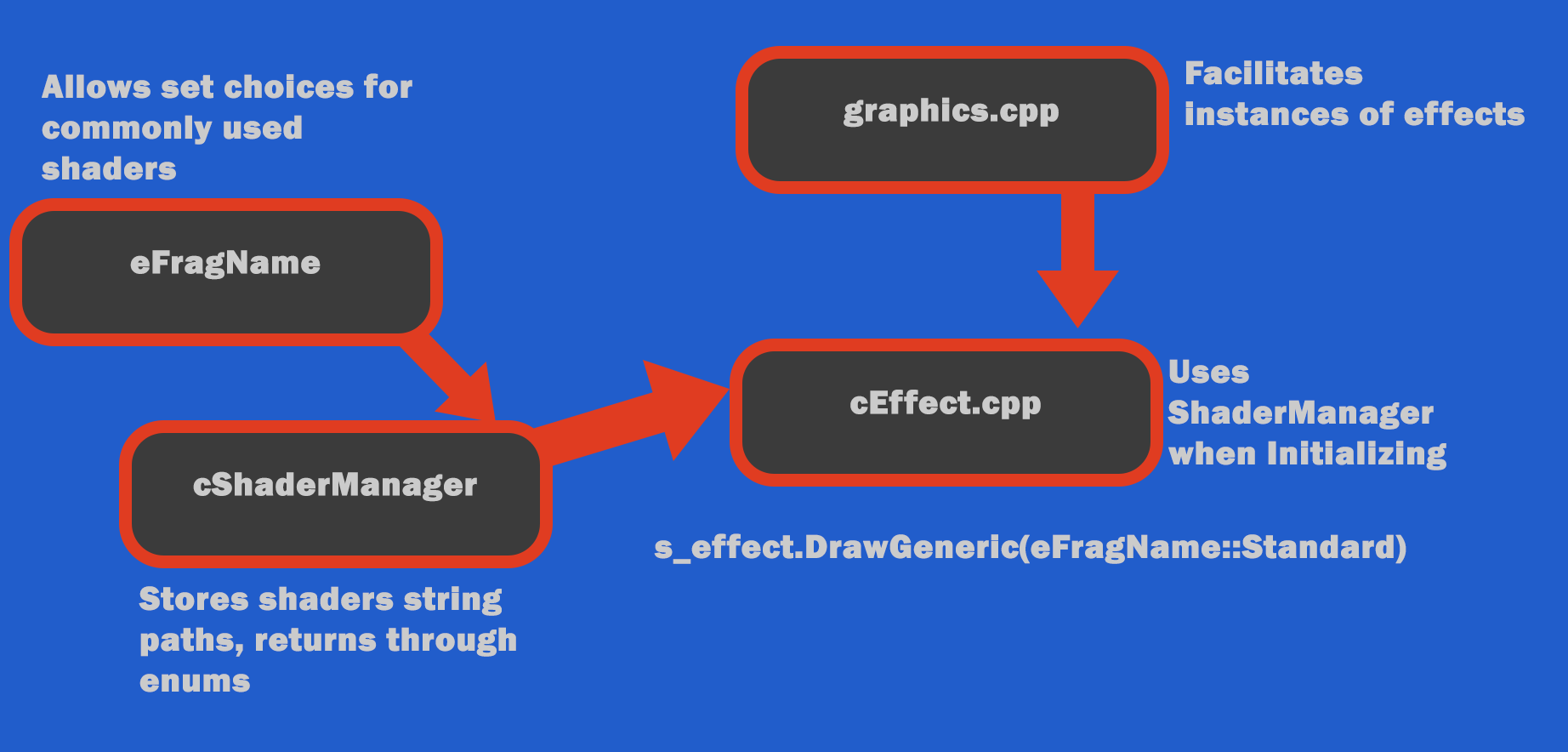
Diagram displaying the relationship between graphics.cpp and Shader Manager
This approach to calling the shaders did have some drawbacks, however. Namely, adding many different shaders to an enum as my game grows in scale is not a practical use of my time - and the namespaces required to actual call the Shader Manager create such a long line of code, as to partially defeat the point. Besides, I thought after completing the exercise - It’s all gonna change when I abstract this to the game layer, anway.
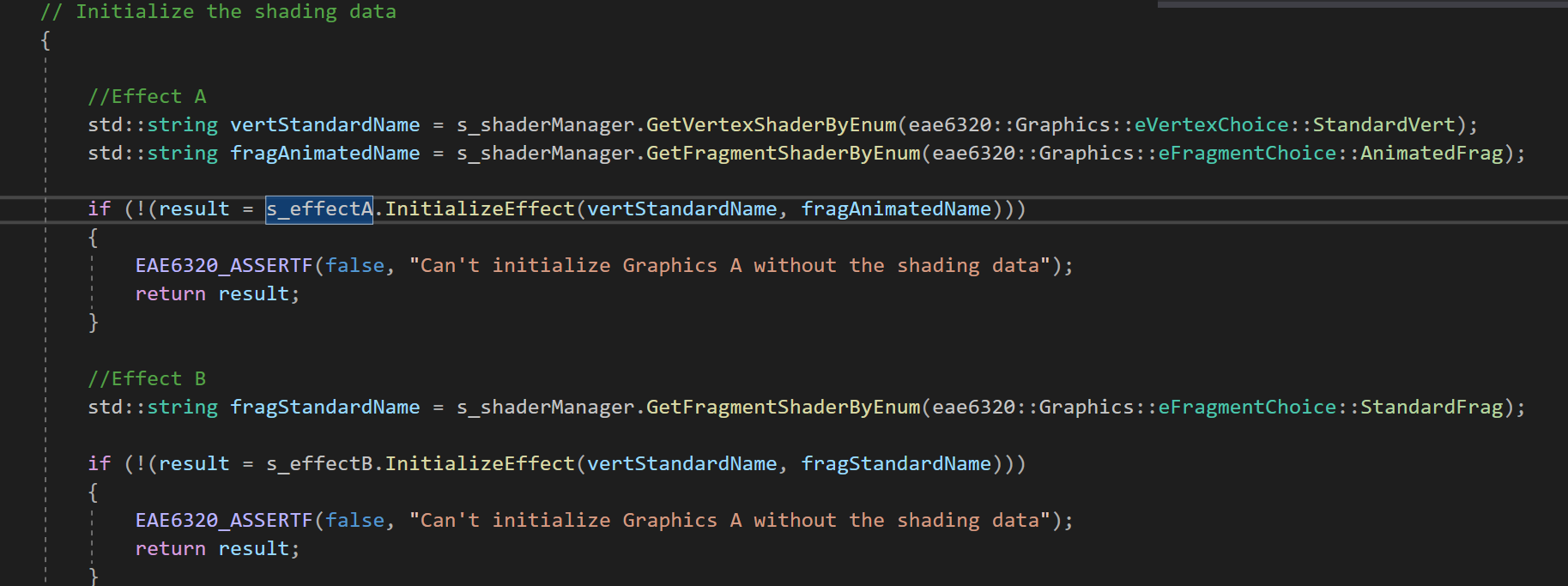
Passing shader variable names to the effect initialization with the help of the ShaderManager
New Mesh Interface:
After realizing that I had created a dedicated interface for a system that would likely change very soon, I decided to go another direction when abstracting my mesh class. The goal of this task was so remove any hard-code mesh initialization values from the class itself, allowing users to specify the data they want to be initialized. I knew that this system would eventually be moved to the game layer with its own interface, and thus chose to keep my current implementation simple.
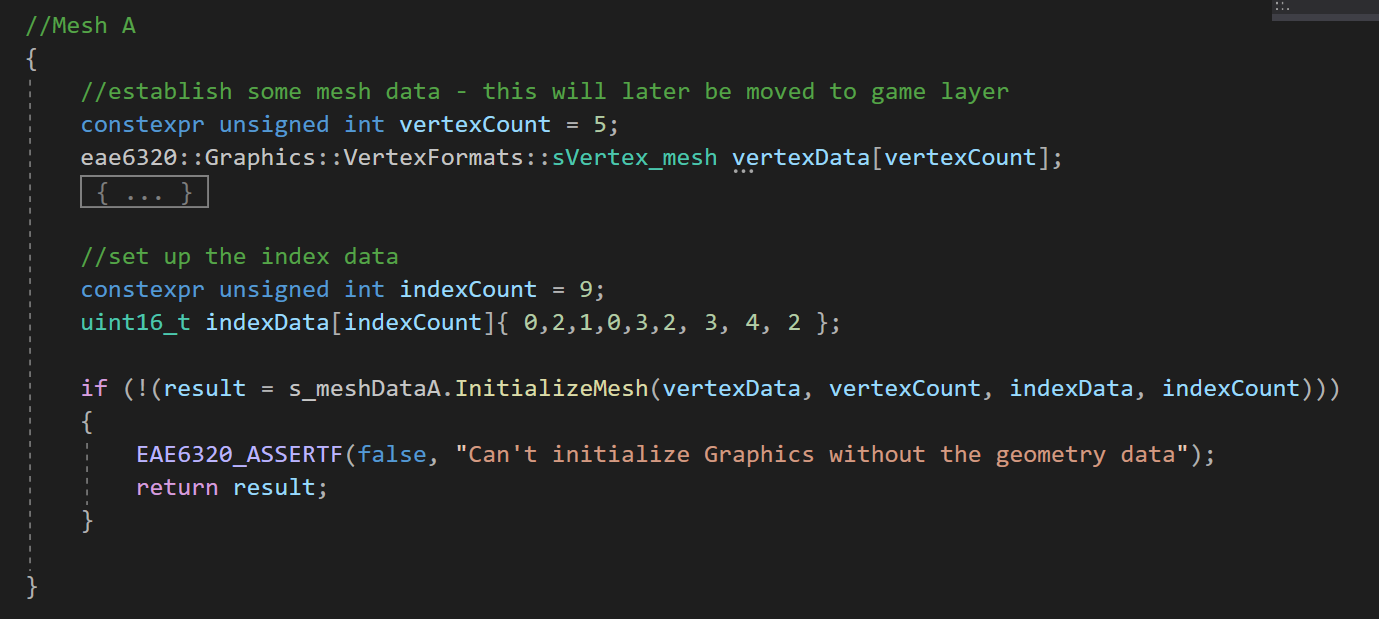
Initializing a mesh with specified data in graphics.cpp
Demonstrated in the above image, users need to supply a mesh with 4 pieces of data in order to initialize: a vertexData struct, the number of vertices in that struct, an index data array, and the number of elements in that array. This was a challenge for me, and resulted in an implementation that I’m not entirely satisfied with. Ideally, I wanted users to only need to submit vertex and index data, with the counts being inferred/calculated in the Initialization function. However, because arrays decay to pointers when passed as function parameters, there was no simple way to obtain these counts inside the function. I will continue to work on this problem in future weeks, as I figure out the easiest way for users to input as little data as possible while still exerting high levels of specificity over mesh creation.
Implementing Indexed Drawing:
A major success this week was the implementation of indexed drawing for both openGL and D3D. This means that rather than storing every vertex position for each time it’s drawn (a very costly process), each is stored once, with an index array determining the order that these vertices are drawn in. This one change massively boosts performance by limiting the number of unique vertices that are drawn to the screen.
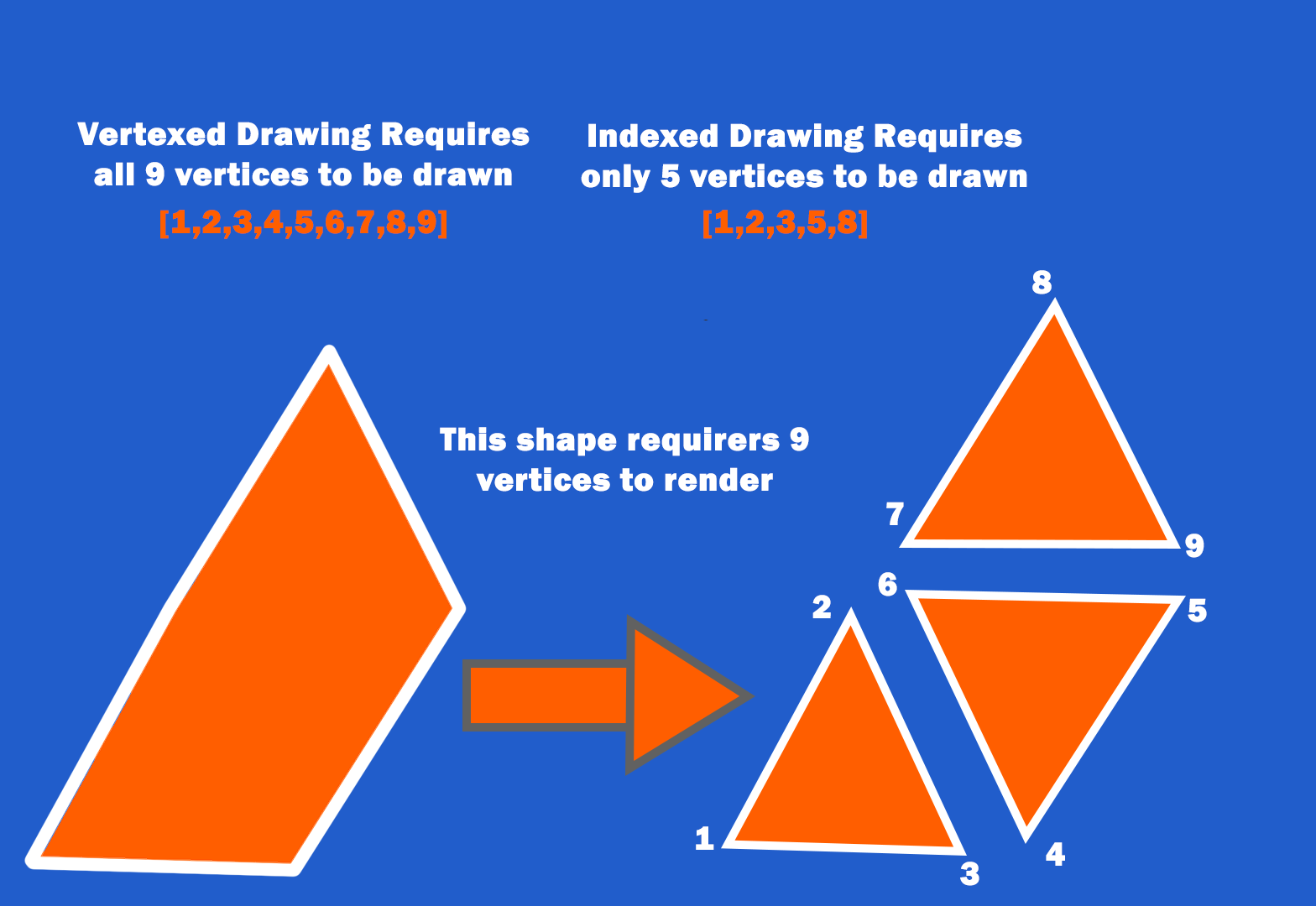
Graph demonstrating the difference between indexed and vertexed drawing - exciting!
In addition to the performance benefits, indexed drawing helped provide a solution for another nasty problem: winding orders. For those who are unfamiliar, Direct3D and openGL render their vertices per triangle in opposite orders. This is an issue because supplying a lefthanded set of vertex data to openGL (which is righthanded), results in the triangles being drawn backward, thus becoming invisible to the viewer. It’s unreasonable to expect users to submit two sets of data for every mesh they want to render, but manually altering the order of vertex data is also not very feasible. My solution was to enforce a left-handed standard for winding order, allowing users to only submit a single set of data for both platforms. If the platform is rendering in OpenGL, the index data is then shifted to draw its triangles in reverse order, providing a platform-agnostic interface without altering any vertex data.
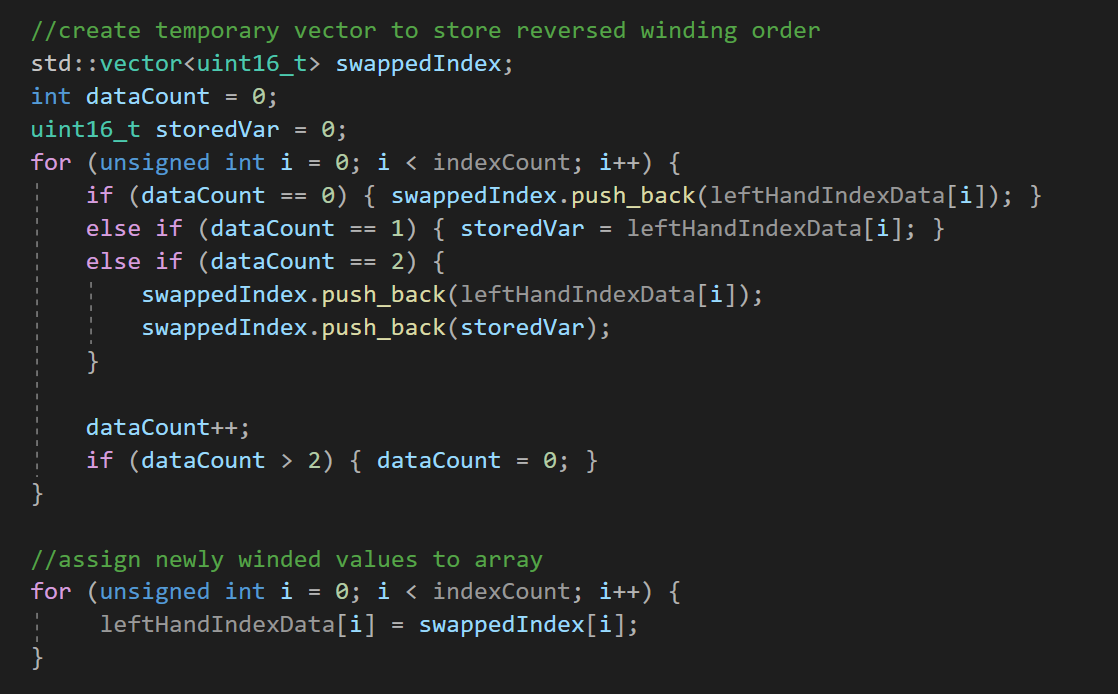
Code in cMeshData.gl, which swaps the indexed winding order
Week Overview:
For this assignment, I continued my work from last week by making the graphics system in my custom engine entirely platform-independent. I removed the separate .d3d and .gl versions of my graphics file, replacing them with a standardized and platform-agnostic graphics.cpp file. This is a critical step toward creating a user-friendly engine, abstracting away complex tasks like establishing winding orders and buffer swapping to less immediately apparent manager classes. In addition, I added better interfaces and user specifications for mesh and effect loading, added support for animated background colors, and increased the engine’s peformance by switching from vertex-based to indexed drawing. The main challenges of this week are summarized below:
Understanding the useful lifespan of stored variables.
Weighing performance against useability.
Finding a balance between short-term fixes and overly-architectured future blueprints.